
Friday, August 22, 2008
Restore Exchange public folders from BackupExec backup.
Exchange 2003 public folders Backup Exec 12 (disk backup). Then try to restore a single Public folder Backup exec restore can not open Public Folders selection with message "You must install additional languages on this computer to see selection". Public folders have a folder with Japanese language. Solution was to install East Asian languages from - Control Panel - Regional and Language Option. Below is the screen:


Forms authentication and Microsoft documents.
The issue was - you can not open Microsoft document from MOSS2007 document library, then you use Forms authentication. You can save document on your local drive by clicking of right button on the link, but then you try to open it just by clicking the link it return you an error or blank document.
Solition was to go to the SharePoint "Central Administration > Application Management > Authentication Providers > Edit Authentication" for Zone with Forms Authentication and change "Enable Client Integration" to "No", after that a Microsoft Document can be open in Read Only mode just by clicking on the link. To edit the document you still need to save it outside of SharePoint and upload it back after. Here is good reference: http://msdn.microsoft.com/en-us/library/bb977430.aspx
Previous case was for HTTP access, but if you use HTTPS and try to open a Microsoft document - you have message "The website you want to view request identification. Please, choose a certificate." Solution was to use reverse proxy in my case ISA2006 and publish the SharePoint site. However, you will need to configure ISA rule properly. Below are some configuration screens:
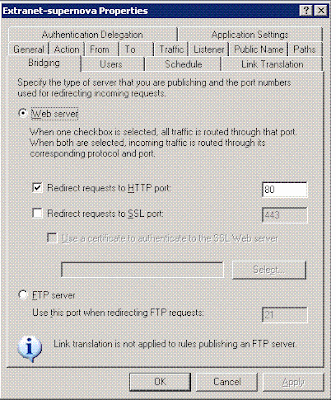

What is very ipmportant here is ability ISA to translate HTTP links to HTTPS links back to user's browser, otherwise despite on initial HTTPS request SharePoint will answer with HTTP links (references) on it's pages.
Solition was to go to the SharePoint "Central Administration > Application Management > Authentication Providers > Edit Authentication" for Zone with Forms Authentication and change "Enable Client Integration" to "No", after that a Microsoft Document can be open in Read Only mode just by clicking on the link. To edit the document you still need to save it outside of SharePoint and upload it back after. Here is good reference: http://msdn.microsoft.com/en-us/library/bb977430.aspx
Previous case was for HTTP access, but if you use HTTPS and try to open a Microsoft document - you have message "The website you want to view request identification. Please, choose a certificate." Solution was to use reverse proxy in my case ISA2006 and publish the SharePoint site. However, you will need to configure ISA rule properly. Below are some configuration screens:


What is very ipmportant here is ability ISA to translate HTTP links to HTTPS links back to user's browser, otherwise despite on initial HTTPS request SharePoint will answer with HTTP links (references) on it's pages.
Thursday, August 21, 2008
Vista DNS problems
I discovered DNS resolution problems on Vista Ultimate sp1. In my case it can not resolve DNS alieses from Active Directory DNS servers. The fix what I found - restart "DNS Client" service. Despite, I tried to set (DWORD)"HKEY_LOCAL_MACHINE\SYSTEM\CurrentControlSet\Services\Dnscache\Parameters\NegativeCacheTime" to 0 it does not help.
P.S. After investigation it was DNS servers problem, DNS servers can not communicate with Internet (wrong gateway after firewall replacement) and Vista goes to External DNS for public names resolution. After what it tries to use external DNS for local names resolution and failed.
P.S. After investigation it was DNS servers problem, DNS servers can not communicate with Internet (wrong gateway after firewall replacement) and Vista goes to External DNS for public names resolution. After what it tries to use external DNS for local names resolution and failed.
Tuesday, August 05, 2008
Add ESX server license to VMware Virtual Center
1. Copy a generated license file to the VMware license server directory (default - C:\Program Files\VMware\VMware License Server\Licenses).
2. Run VMware License Server Tolls - goto "Start/Stop/Reread" Tab - Push "ReRead License File" Button.
3. After that you can connect with VMware Host.
4. If VMware Infrastructure Client connected to Virtual Center still show evaluation mode, you need to go to Administration - VirtualCenter Management Server Configuration - License Server and ucheck "Evaluate VirtualCenter Server" check box and choose "Use license services on this VirtualCenter Server" radio button (if the license server installed locally).
2. Run VMware License Server Tolls - goto "Start/Stop/Reread" Tab - Push "ReRead License File" Button.
3. After that you can connect with VMware Host.
4. If VMware Infrastructure Client connected to Virtual Center still show evaluation mode, you need to go to Administration - VirtualCenter Management Server Configuration - License Server and ucheck "Evaluate VirtualCenter Server" check box and choose "Use license services on this VirtualCenter Server" radio button (if the license server installed locally).
Subscribe to:
Posts (Atom)